
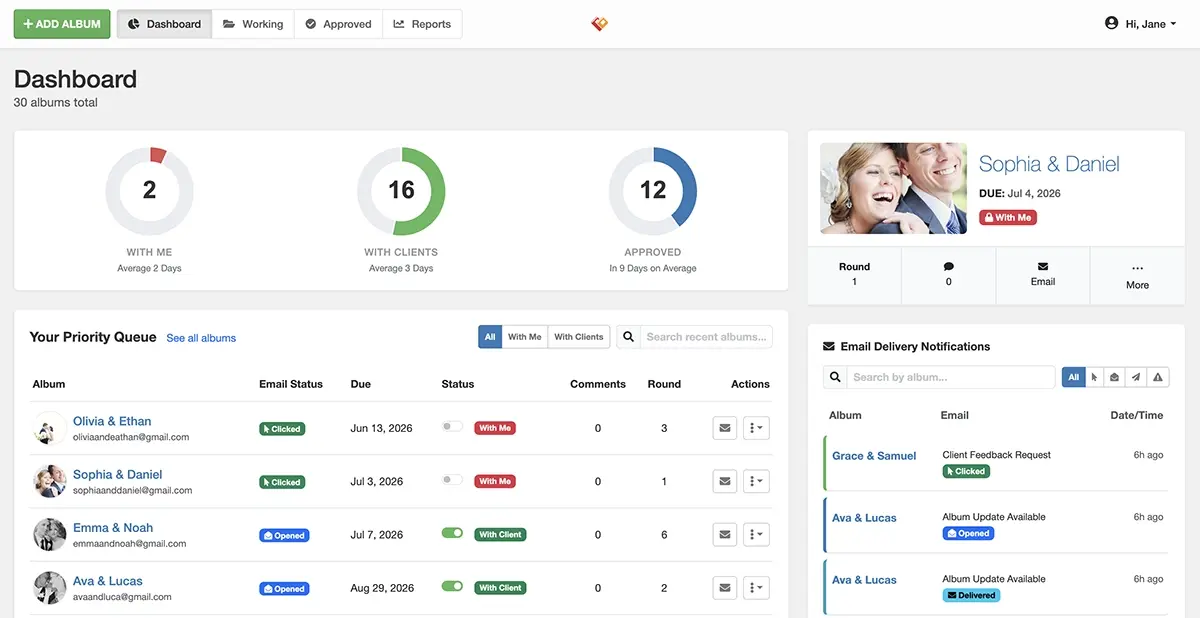
We’ve been heads-down building, and today we’re excited to share everything that’s new. This isn’t a minor update — it’s a full rebuild, designed to make album proofing faster, smarter, and more accessible than ever.
A Complete Redesign, From the Ground Up
The moment you log in, you’ll notice it immediately. Every screen has been redesigned from scratch — not just restyled, but rethought. Cleaner layouts, better use of space, and a consistent visual language that gets out of your way so you can focus on your work.
We moved away from the old interface and built something that feels modern and responsive across all devices. Whether you’re on a desktop in your studio or checking in on a proof from your phone, the experience holds up. We also improved load times and made navigation more intuitive throughout.
This redesign wasn’t just cosmetic. Every interaction was reconsidered — from how albums are displayed, to how modals open and close, to how feedback is shown when something succeeds or fails.
A Free Plan, So Anyone Can Get Started
Banti now has a free plan — no credit card, no trial clock, no catch.
Free plan users get one active album at a time, forever. It’s a great way to see exactly how client proofing works before committing to a paid subscription. You can upload spreads, share the album with a client, collect comments, and approve the final version — the full workflow, just one album at a time.
When you’re ready to grow, upgrading to a monthly or annual plan unlocks unlimited albums and the rest of Banti’s advanced features. But if you only need to proof one album at a time, free is a completely legitimate option and we’re happy to support it.
Reports Page: See How Your Studio Is Performing
The new Reports page gives you real data about how your proofing workflow is running.
You can see how long albums typically spend with you versus with clients, track turnaround trends over time, and identify where things slow down. If you’ve ever wondered whether you’re the bottleneck or your clients are, the Reports page answers that question clearly.
It’s designed to be practical, not just pretty. The goal is to give you the kind of insight that helps you have better conversations with clients, set more realistic timelines, and run a tighter operation overall.
This feature is available to paid subscribers only.
New Dashboard with a Priority Queue
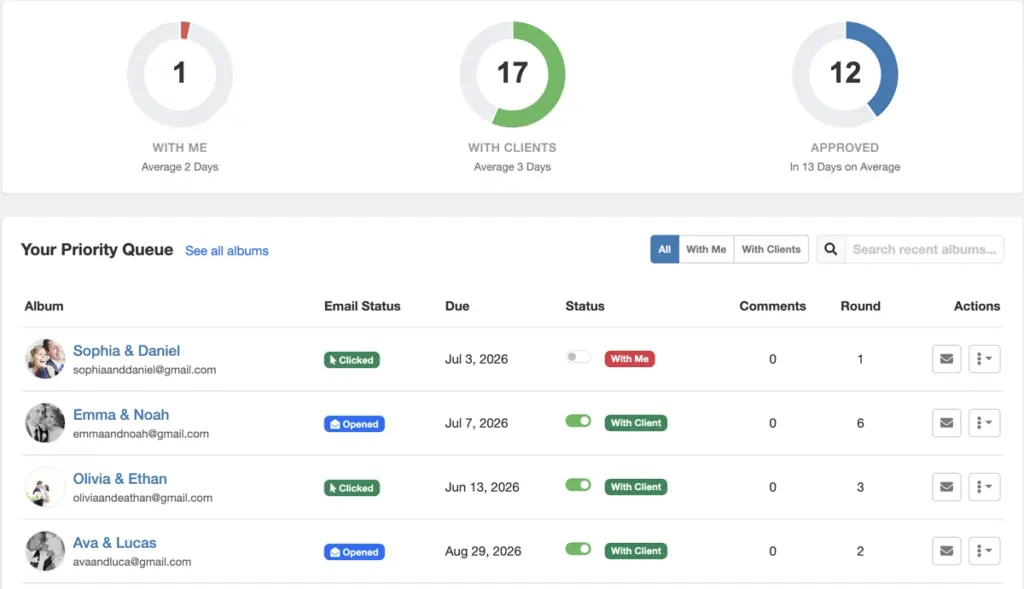
The redesigned Dashboard leads with your Priority Queue — a focused view of only the albums that need your attention right now.
The queue shows your active (non-approved) albums sorted by what’s most pressing. Each row tells you:
- Album name and client email — so you know exactly whose album you’re looking at
- Email status — whether your last email was sent, opened, clicked, or bounced
- Due date — when comments are expected back
- Lock status — whether the album is with you (locked) or with your client (unlocked), with a toggle to switch it instantly
- Comment count — so you can see at a glance if clients have been active
- Review round — which revision cycle you’re on
- Quick actions — email, approve, delete, and more, all accessible without leaving the queue
The idea is to open the Dashboard and immediately know what to do next, without having to click into each album individually.
Bulk Delete for Approved Albums
Approved albums accumulate fast. The new Approved Albums page lets you select multiple albums at once and delete them in bulk.
This is especially useful at the end of a busy season when you want to clear out completed work without clicking through each album one by one. Select all, review what you’re removing, confirm, and it’s done. Your storage stays clean and the list of active albums stays manageable.
Overall Performance and Experience Improvements
Across the board, Banti is faster and more reliable.
Pages load quicker. Actions like toggling lock status, sending emails, and approving albums now respond instantly with optimistic updates — the UI reflects your action immediately rather than waiting on the server. Errors are surfaced clearly and inline rather than as generic alerts.
The email modal has been improved to let you adjust the round number, due date, and lock status directly from the compose window. When you open the modal for a locked album, it automatically unlocks — because if you’re sending a review email, the album should be in your client’s hands.
Language support has been expanded as well. Banti now supports English, German, Spanish, French, Italian, and Portuguese, with locale detection based on your browser settings and a language switcher in the top navigation.
These updates are live now. Log in and take a look — and as always, if you run into anything or have feedback, we want to hear it.